
Know what's left to spend.

Type "coffee 4.50", check it, save it. No account, no ads. Your money stays on your phone.

  • No account
  • No ads
  • Stays on your phone

iPhone, in English, 中文(简体・繁體), and Bahasa Melayu.

Quick entry
See how it works

The two reasons people switch

Everything else is nice. These two are why people stay.

REASON 1

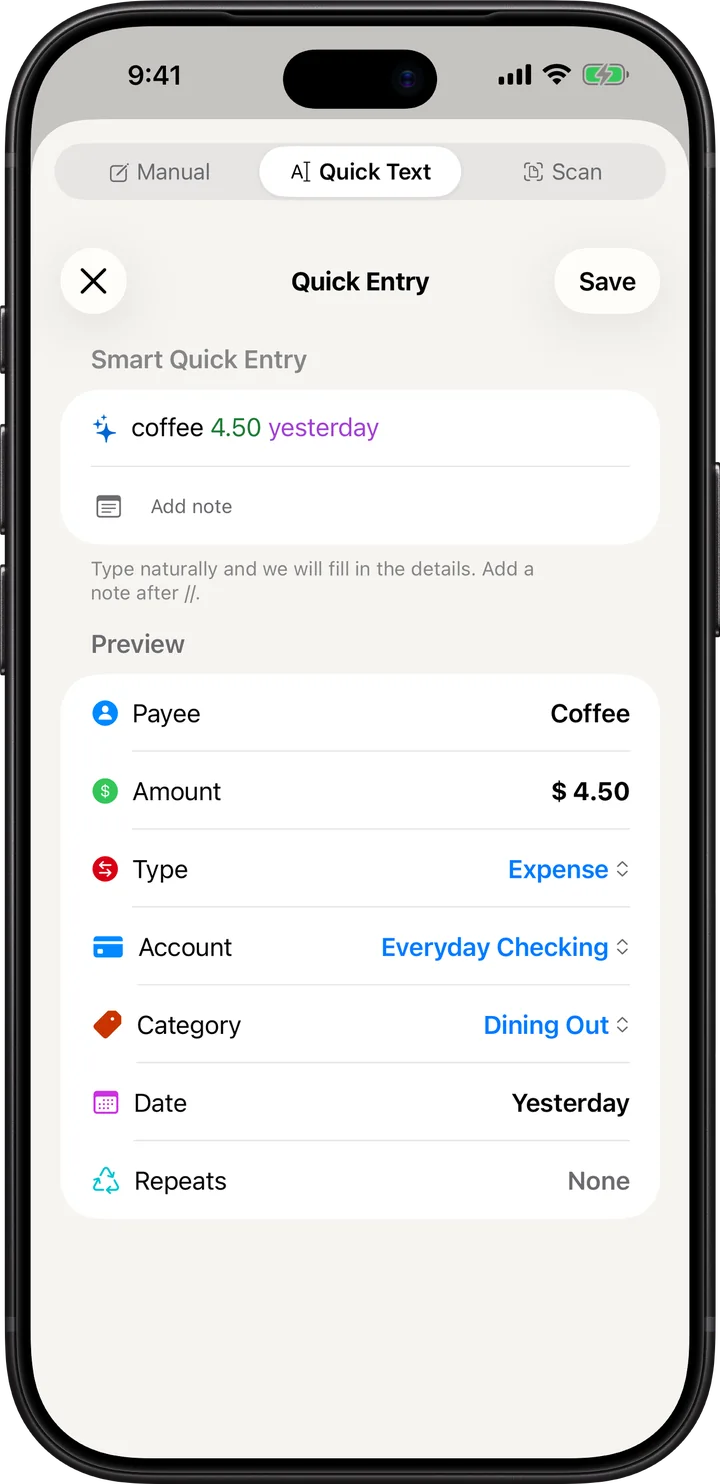
Type "lunch 12". Check it. Save it.

No forms. Type it like a text. Snap a receipt and it reads every line.

REASON 2

Your money stays on your phone.

No sign-up. No ads. No server of ours ever sees your money. iCloud sync only if you turn it on.

Everything the app does

The full feature set, exactly as it ships.

ADD EXPENSES IN SECONDS

One sentence is a full record

Type "coffee 4.50". Budgetine reads the amount and picks the category. Dates, repeats and notes come from the same line.

4.50 Dining Out Yesterday Repeats weekly
SCAN RECEIPTS, LINE BY LINE

Snap it, check it, done

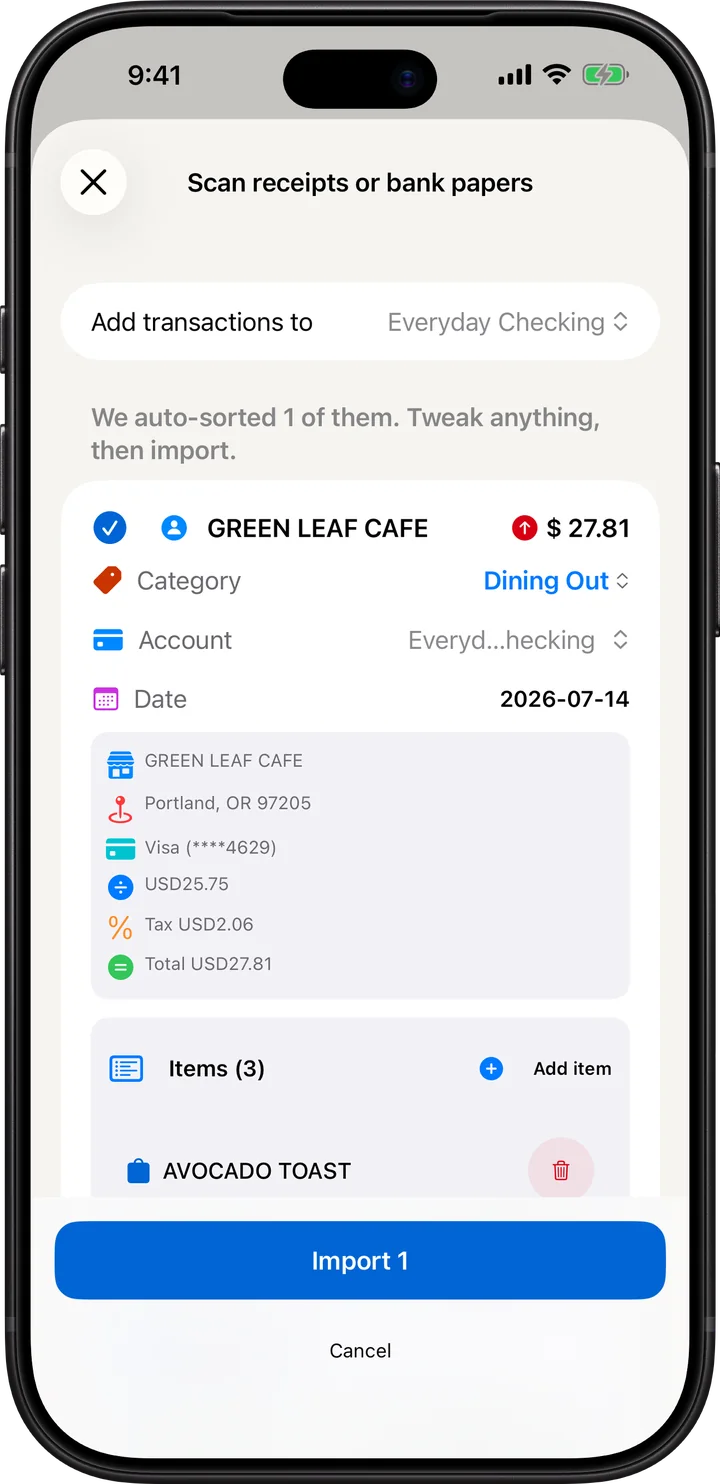
Snap a receipt. Budgetine reads the shop, the total and every item. Fix any line, then save. All on your phone.

GREEN LEAF CAFE
Iced latte4.50
2.20
Chicken sandwich8.50
Total15.20

The scanner misread one line. Tap it.

PLAN EVERY DOLLAR

Know what's left before you spend it

Give each envelope a budget. See what's left for food, transport or fun before you spend.

Tap an envelope to spend from it.

STAY AHEAD OF YOUR BILLS

Nothing sneaks up on you

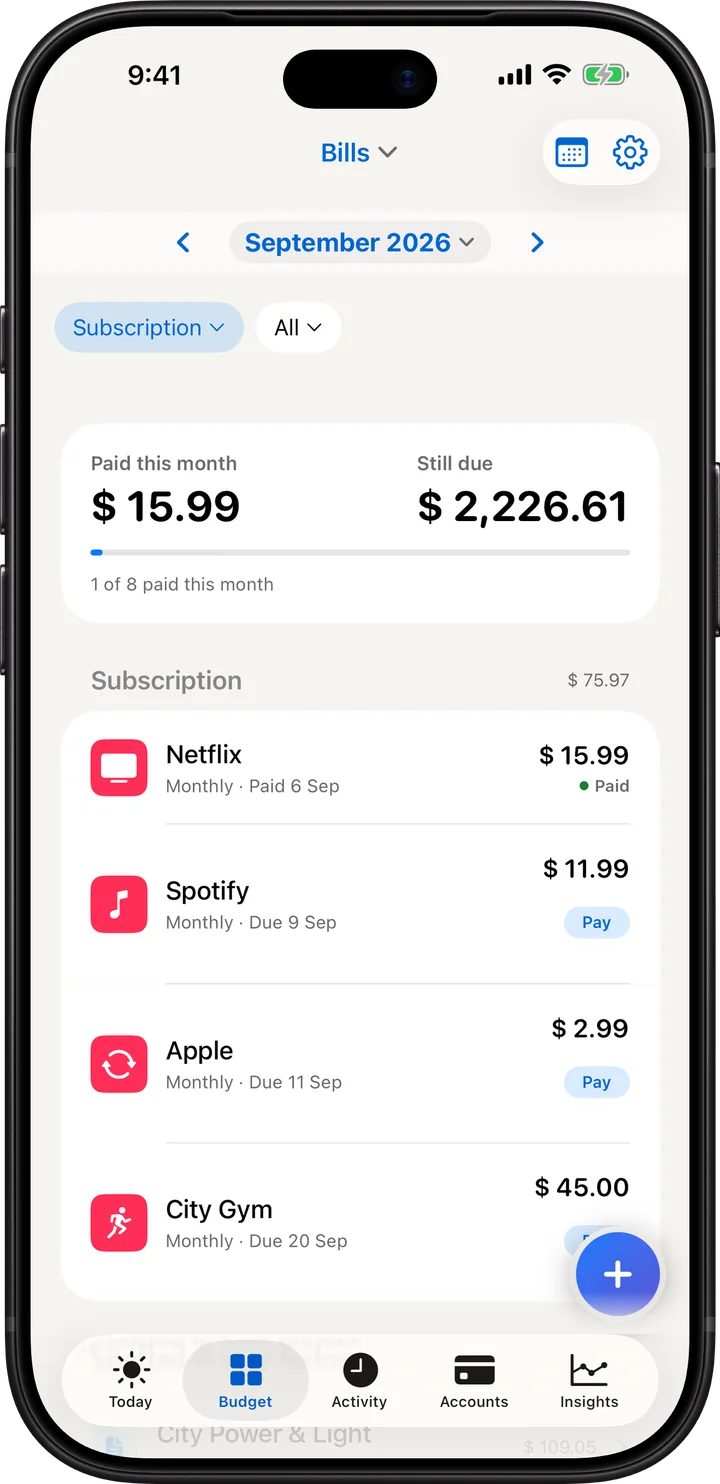
Subscriptions, instalments and pay later plans in one place. See what your subscriptions cost per month and per year, get a reminder before a trial ends, and watch a pay later purchase pay itself down. If a price goes up, you hear about it.

Tap a bill to pay it.

WATCH YOUR MONEY GROW

Goals you fund month by month

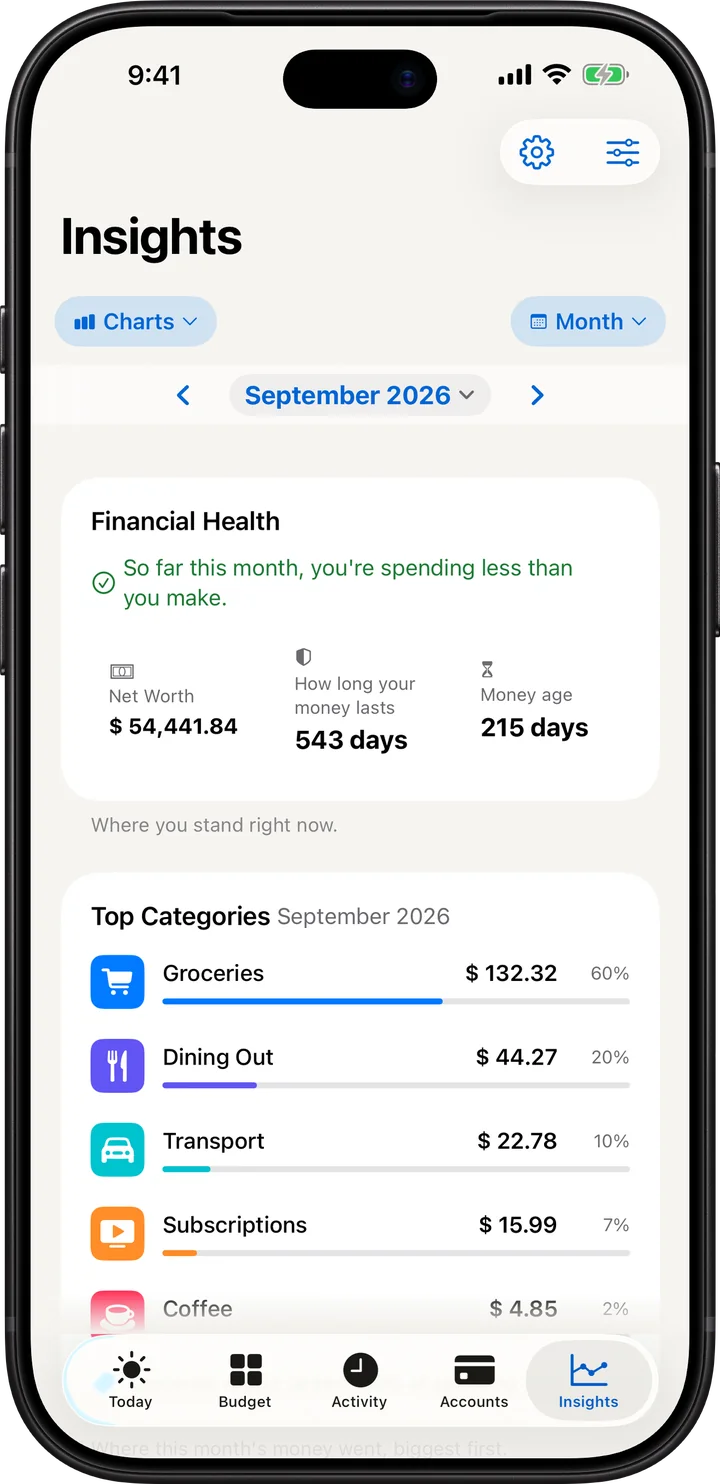
Set a goal. Fund it each month. Reports show where your money went.

Japan trip
2,040 saved of 3,000.
On pace for March.
Where it went

Fund the goal. Tap a bar for its share.

Speaks your language

English, Chinese (Simplified and Traditional) and Bahasa Melayu. Accounts in any currency.

Smart help, fully private

On supported iPhones, Apple Intelligence picks the category and tidies receipt text. All on your phone.

Private by design

Lock it with Face ID. Export or delete your data any time.

Your data, portable

Back up to a file. Restore on a new phone. iCloud sync is optional. No account, ever.

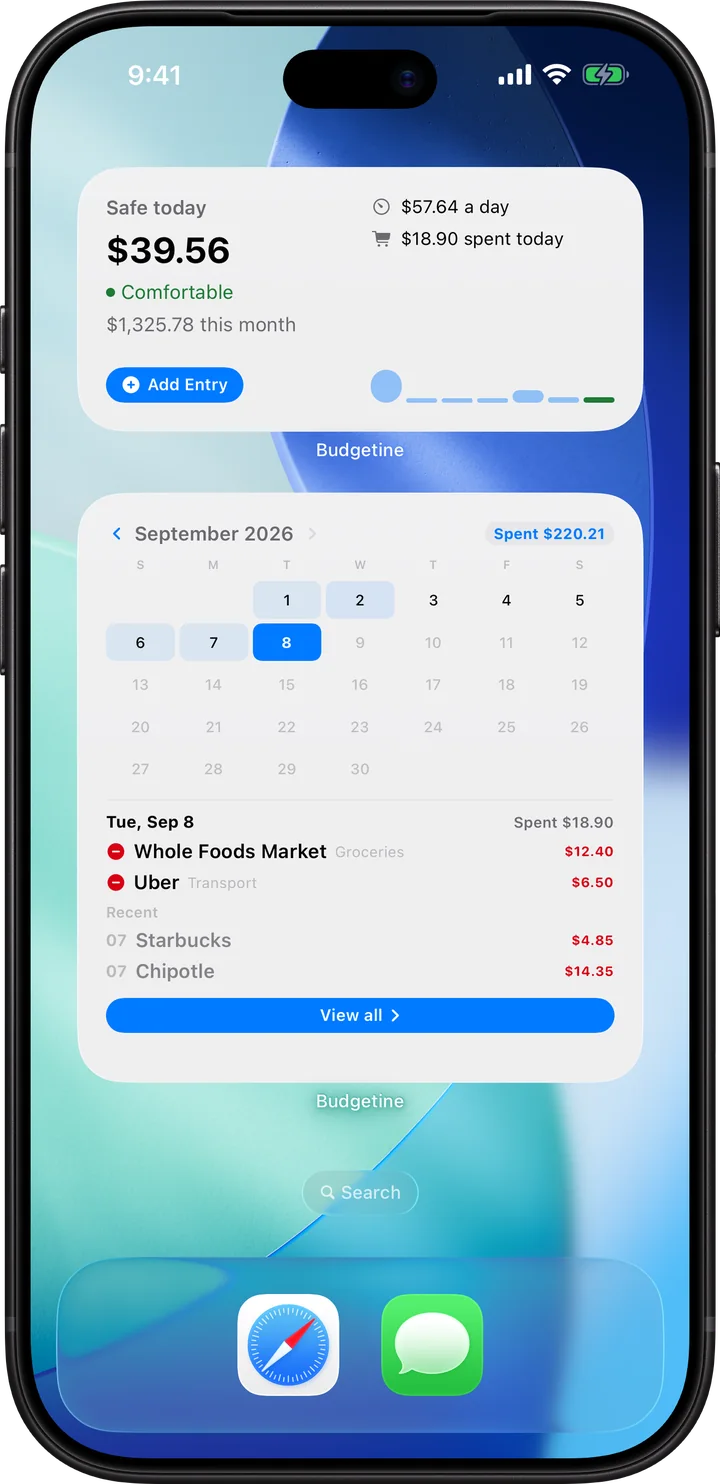
ON YOUR HOME SCREEN

Check your budget without opening the app

Five widgets, three sizes. Tap a day on the calendar to see what you spent.

August
1,196.90 spent this month
Tap a day.

Tap a day, or step back a month.

SUBSCRIPTIONS

What your subscriptions really cost

Streaming, cloud storage, the app you tried once. Budgetine adds them up, per month and per year, from the payments you record.

  1. Record the payment once, or tick it when you import a statement.
  2. Bills shows what each one costs per month and per year, and which renews next.
  3. A reminder lands before a free trial ends or a cancel-by date passes.

Budgetine works from the records you enter. It does not connect to providers, and it cancels nothing for you.

The cost totals, trial reminders and price history arrive in version 1.1, planned for November 2026.

Three subscriptions, added up

45.00 per month

Next renewal: Streaming, in 6 days.

Example amounts. Yearly assumes twelve unchanged months. Untick one to see the difference.

A day with Budgetine

Real screens. Scroll, and the phone follows along.
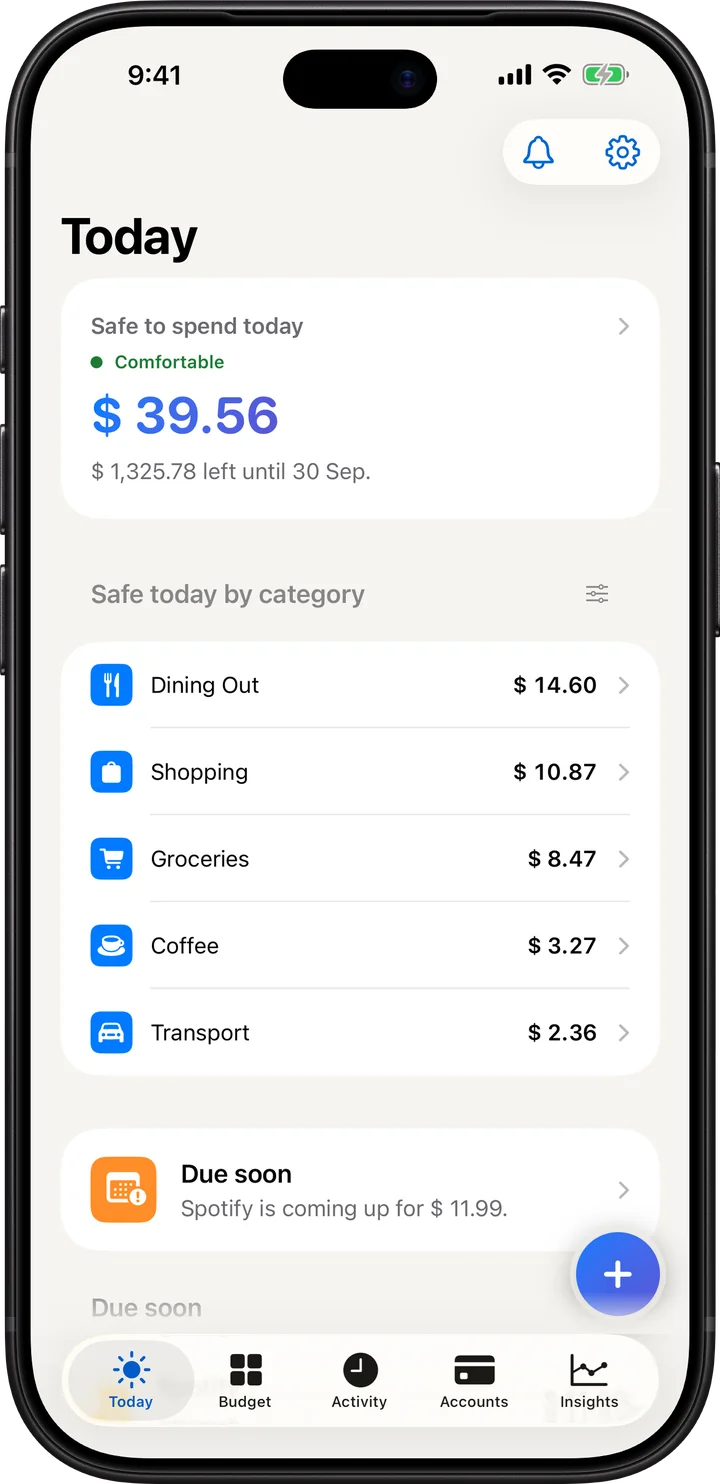
MORNING

Start the day knowing what's safe to spend.

One number, before you leave the house.

LUNCH

Type "lunch 12". Check it. Save it.

No forms. The sentence fills in the details.

THE RECEIPT

Snap it. Every line, read on your phone.

Fix any line before it saves.

THE BILLS

Nothing sneaks up on you.

A reminder before each bill lands.

MONTH END

See where it went.

Reports from your own spending, made on your phone.

ANY TIME

Your budget, without opening the app.

Five widgets, three sizes.

Your money stays on your phone.

No sign-up. No ads. No server of ours ever sees your money. iCloud sync only if you turn it on.

How we keep that promise

Not a policy, a design decision. We couldn't read your money if we wanted to.

  • No account and no sign-up
  • Your money data stays on your device by default
  • No ads or advertising trackers
  • Optional, consent-only product analytics
  • Receipts scanned on-device
  • Face ID app lock
  • Export or delete everything, anytime
  • Raw analytics events kept for up to 90 days; anonymous summaries kept longer

The full story is short on purpose: read the privacy policy.

Simple pricing

Free to use. Pro removes the limits and adds every live widget, deeper reports and Smart Suggestions.

Free and Pro both include

  • Envelopes, bills, subscriptions and Safe to Spend
  • Manual entry
  • Siri, Control Center and Apple Wallet automation
  • Spending and top categories
  • Face ID lock, private iCloud sync and full backups

Pro adds

  • Smart Suggestions, on-device AI*
  • Cash Flow and Net Worth charts
  • Highlights: what's up and what's wrong
  • How long your money lasts
  • Insights for loans, cards and investments
  • Alerts when a subscription price goes up
  • Spreadsheet export (CSV)
What you get with Budgetine for free and with Budgetine Pro
FeatureFreeBudgetine Pro
Accounts5Unlimited
Goals and category targets3Unlimited
Quick Text: type "lunch 12"30 a monthUnlimited
Receipt scans and statement imports3 a monthUnlimited
Home Screen and Lock Screen widgets with live numbersSafe to SpendAll 5
App iconsClassicAll 4

Monthly limits reset at the start of each month. Receipt scans and statement imports share the same 3. Closed accounts count toward the 5.

* Smart Suggestions needs an iPhone with Apple Intelligence (iPhone 15 Pro or newer on iOS 26).

Monthly

RM 14.90/month

14-day free trial. Cancel anytime.

Save 50%

Annual

RM 89.90/year

One month free. Cancel anytime.

Lifetime

RM 49.90 once

Pay once. Pro stays unlocked, and nothing renews.

Scan with your iPhone QR code that opens Budgetine on the App Store

These are the App Store's prices on 2 October 2026. Apple can change them when exchange rates or taxes move, and bills you in your App Store region's currency.

Referral tracking is being tested. Sharing an invite does not currently unlock Pro.

Common questions

More on the support page.

Is my data backed up?

Your data lives on your phone. Export a backup from Settings and import it on a new phone. iCloud sync keeps a copy in your own iCloud, which we cannot see.

Do I need an account?

No. Nothing to sign up for. It works offline.

How much does Budgetine cost?

The app is free. Budgetine Pro is RM 14.90 a month, RM 89.90 a year, or RM 49.90 once in Malaysia. In the United States that is USD 3.99, USD 29.99 and USD 14.99, and in Singapore SGD 5.98, SGD 39.98 and SGD 14.98. Monthly comes with a 14-day free trial and annual comes with one month free.

Is Budgetine free?

Yes. The free app covers everyday budgeting and keeps working. Pro adds unlimited accounts, goals and scans, deeper reports and Smart Suggestions.

Does Budgetine connect to my bank?

No. There is nothing to link and no credentials to hand over. You type an entry as one sentence or snap a receipt, which is exactly what lets your records stay on your phone.

Can I use Budgetine offline?

Yes. There is no account and no sign-up, so the whole app works with no connection at all. iCloud sync is optional and off by default.

What does Budgetine send off my phone?

Optional iCloud sync copies records and receipts to your private iCloud. Optional analytics and referrals use limited service data, never financial records. Raw analytics events are kept for up to 90 days; anonymous daily summaries are kept longer. Apple handles purchases and app-version checks. The privacy policy has the details.

What happens if I stop paying for Pro?

The free app keeps working. Pro features lock again. Your data stays yours, and you can export it.

What languages does Budgetine speak?

English, Simplified Chinese, Traditional Chinese and Bahasa Melayu. Every screen is translated, not only the menus.

Is Budgetine on Android?

Not today. Budgetine is an iPhone app.

Does Budgetine work outside Malaysia?

Yes. It's built in Malaysia and works in other countries too. Pick your country in the pricing section to see what the App Store charges there. Apple bills you in your App Store region's currency.

How is Budgetine different from other budgeting apps?

Two things. You log spending by typing one sentence instead of filling in a form, and it tells you what is safe to spend before payday rather than only showing where the money went afterwards. It also runs with no account, so no server of ours holds your financial records.

Who makes Budgetine?

One person, in Malaysia. Edson Leng built it on nights and weekends after three years of using budgeting apps that none of his friends could afford.